Building Microservices with RabbitMQ: A Complete Guide
Learn how to implement message-driven microservices architecture using RabbitMQ with practical examples and best practices.
Amr S.
Author & Developer
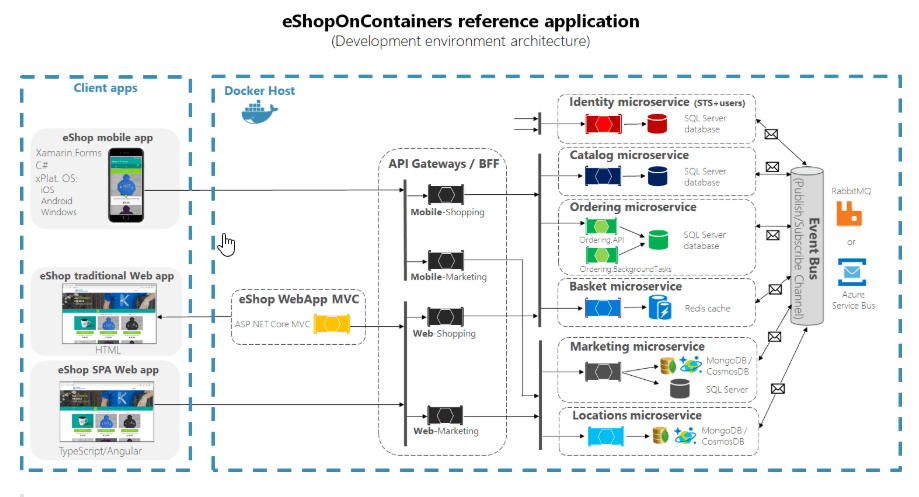
Building Microservices with RabbitMQ: A Complete Guide
RabbitMQ is a powerful message broker that enables microservices to communicate asynchronously. In this complete guide, we'll build a microservices system step by step.
Why RabbitMQ for Microservices?
RabbitMQ provides several key benefits for microservices architecture:
- Decoupling: Services don't need to know about each other
- Reliability: Messages are persisted and guaranteed delivery
- Scalability: Easy to scale individual services independently
- Flexibility: Support for multiple messaging patterns
💡 RabbitMQ uses AMQP (Advanced Message Queuing Protocol), making it language-agnostic and highly interoperable.
Step 1: Setting Up RabbitMQ
First, let's set up RabbitMQ using Docker:
# Pull and run RabbitMQ with management plugin
docker run -d --name rabbitmq \
  -p 5672:5672 \
  -p 15672:15672 \
  rabbitmq:3-management

# Access management UI at http://localhost:15672
# Default credentials: guest/guest
Step 2: Installing Dependencies
Install the RabbitMQ client library for Node.js:
npm install amqplib
npm install --save-dev @types/amqplib
Step 3: Creating a Connection Manager
Let's create a reusable connection manager:
import amqp, { Connection, Channel } from 'amqplib';

class RabbitMQConnection {
  private connection: Connection | null = null;
  private channel: Channel | null = null;
  private readonly url: string;

  constructor(url: string = 'amqp://localhost:5672') {
    this.url = url;
  }

  async connect(): Promise<void> {
    try {
      this.connection = await amqp.connect(this.url);
      this.channel = await this.connection.createChannel();

      console.log('[RabbitMQ] Connected successfully');

      // Handle connection errors
      this.connection.on('error', (err) => {
        console.error('[RabbitMQ] Connection error:', err);
      });

      this.connection.on('close', () => {
        console.log('[RabbitMQ] Connection closed');
      });
    } catch (error) {
      console.error('[RabbitMQ] Failed to connect:', error);
      throw error;
    }
  }

  getChannel(): Channel {
    if (!this.channel) {
      throw new Error('Channel not initialized. Call connect() first.');
    }
    return this.channel;
  }

  async close(): Promise<void> {
    await this.channel?.close();
    await this.connection?.close();
  }
}

export default new RabbitMQConnection();
Step 4: Implementing the Publisher Service
Create a service that publishes messages to RabbitMQ:
import rabbitmq from '../rabbitmq/connection';

interface Order {
  id: string;
  userId: string;
  items: Array<{ productId: string; quantity: number }>;
  total: number;
  status: 'pending' | 'processing' | 'completed' | 'failed';
}

export class OrderService {
  private readonly exchangeName = 'orders';
  private readonly routingKey = 'order.created';

  async initialize(): Promise<void> {
    const channel = rabbitmq.getChannel();

    // Declare exchange
    await channel.assertExchange(this.exchangeName, 'topic', {
      durable: true,
    });

    console.log('[OrderService] Initialized');
  }

  async createOrder(orderData: Omit<Order, 'id' | 'status'>): Promise<Order> {
    const order: Order = {
      id: `order-${Date.now()}`,
      ...orderData,
      status: 'pending',
    };

    // Save to database (simulated)
    console.log('[OrderService] Order created:', order.id);

    // Publish event to RabbitMQ
    await this.publishOrderCreated(order);

    return order;
  }

  private async publishOrderCreated(order: Order): Promise<void> {
    const channel = rabbitmq.getChannel();

    const message = {
      eventType: 'OrderCreated',
      timestamp: new Date().toISOString(),
      data: order,
    };

    channel.publish(
      this.exchangeName,
      this.routingKey,
      Buffer.from(JSON.stringify(message)),
      {
        persistent: true,
        contentType: 'application/json',
      }
    );

    console.log('[OrderService] Published OrderCreated event:', order.id);
  }
}
Step 5: Implementing the Consumer Service
Create a service that consumes messages from RabbitMQ:
import rabbitmq from '../rabbitmq/connection';
import { ConsumeMessage } from 'amqplib';

export class InventoryService {
  private readonly exchangeName = 'orders';
  private readonly queueName = 'inventory-queue';
  private readonly routingKey = 'order.created';

  async initialize(): Promise<void> {
    const channel = rabbitmq.getChannel();

    // Declare exchange
    await channel.assertExchange(this.exchangeName, 'topic', {
      durable: true,
    });

    // Declare queue
    await channel.assertQueue(this.queueName, {
      durable: true,
    });

    // Bind queue to exchange
    await channel.bindQueue(
      this.queueName,
      this.exchangeName,
      this.routingKey
    );

    // Set prefetch to process one message at a time
    await channel.prefetch(1);

    console.log('[InventoryService] Initialized and waiting for messages...');
  }

  async startConsuming(): Promise<void> {
    const channel = rabbitmq.getChannel();

    channel.consume(
      this.queueName,
      async (msg: ConsumeMessage | null) => {
        if (!msg) return;

        try {
          const content = JSON.parse(msg.content.toString());
          console.log('[InventoryService] Received message:', content);

          // Process the order
          await this.processOrder(content.data);

          // Acknowledge the message
          channel.ack(msg);
          console.log('[InventoryService] Message processed successfully');
        } catch (error) {
          console.error('[InventoryService] Error processing message:', error);

          // Reject and requeue the message
          channel.nack(msg, false, true);
        }
      },
      {
        noAck: false, // Manual acknowledgment
      }
    );
  }

  private async processOrder(order: any): Promise<void> {
    // Simulate inventory check and update
    console.log('[InventoryService] Checking inventory for order:', order.id);

    for (const item of order.items) {
      console.log(`  - Product ${item.productId}: ${item.quantity} units`);
      // Update inventory in database
    }

    // Simulate processing time
    await new Promise(resolve => setTimeout(resolve, 1000));

    console.log('[InventoryService] Inventory updated for order:', order.id);
  }
}
Best Practices
⚠️ Always follow these important considerations when building production microservices with RabbitMQ.
1. Message Persistence
Always use persistent messages for critical data:
channel.publish(exchange, routingKey, buffer, {
  persistent: true, // Survive broker restarts
});
2. Acknowledgments
Use manual acknowledgments to ensure messages aren't lost:
channel.consume(queue, (msg) => {
  // Process message
  channel.ack(msg); // Only after successful processing
}, { noAck: false });
Monitoring and Debugging
Use the RabbitMQ Management UI to monitor:
- Queue depths and message rates
- Consumer connections and performance
- Exchange bindings and routing
- Memory and disk usage
Access it at: http://localhost:15672
Conclusion
RabbitMQ provides a robust foundation for building scalable microservices. By following these patterns and best practices, you can create reliable, maintainable message-driven architectures. Start with simple pub/sub patterns and gradually adopt more advanced features as your system grows.
📝 Explore RabbitMQ's advanced features like priority queues, message TTL, and federation for multi-datacenter deployments.
Tags
Share this article
Enjoying the Content?
If this article helped you, consider buying me a coffee ☕
Your support helps me create more quality content for the community!
☕ Every coffee fuels more tutorials • 🚀 100% goes to creating better content • ❤️ Thank you for your support!
About Amr S.
Passionate about web development and sharing knowledge with the community. Writing about modern web technologies, best practices, and developer experiences.
More from Amr S.
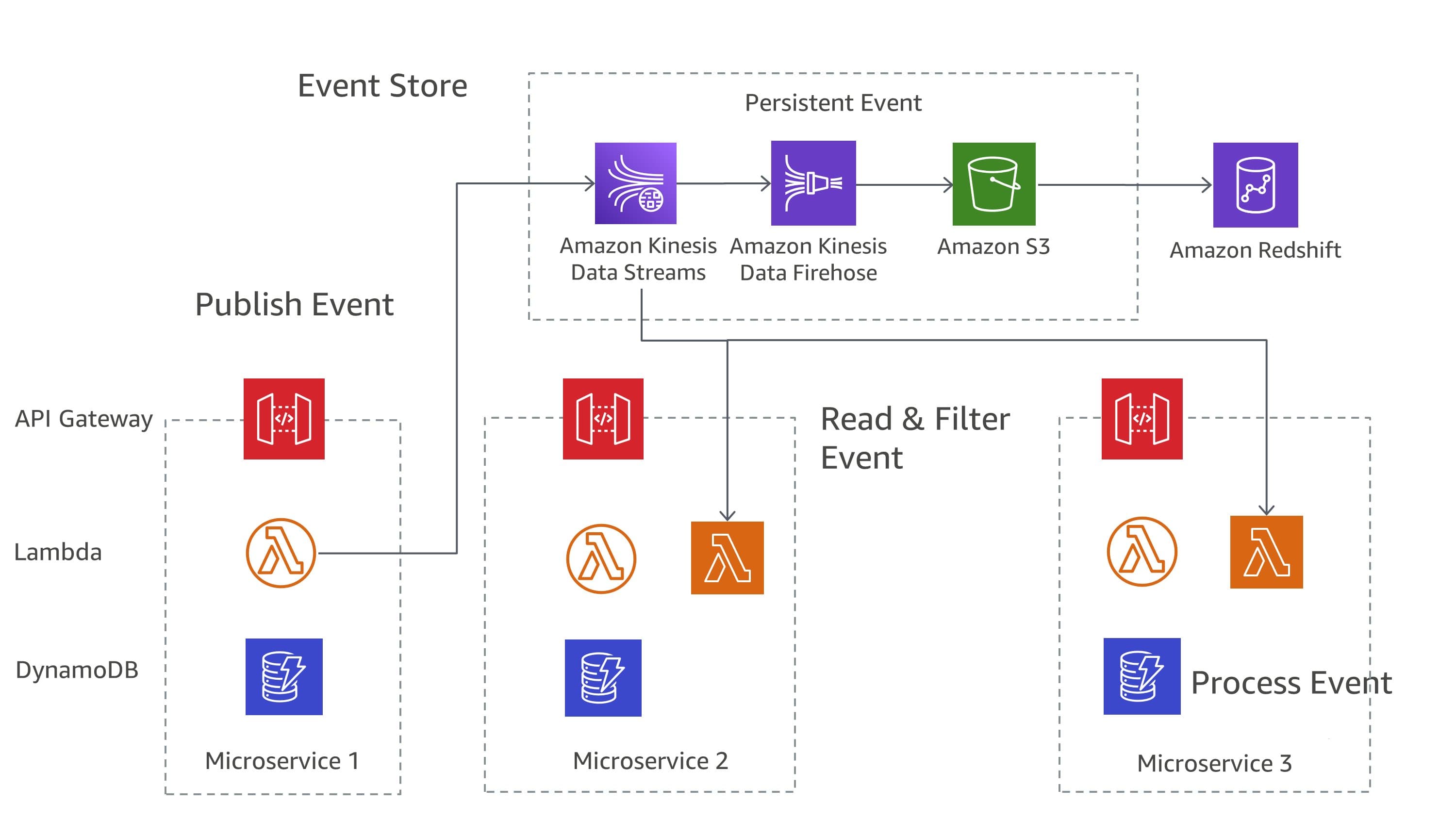
Distributed Systems Design Patterns: Building Resilient Architecture at Scale
Explore proven distributed systems design patterns and learn how to implement Circuit Breaker, Saga, CQRS, and Event Sourcing patterns for building resilient, scalable backend systems.
Modern TypeScript Development: Advanced Patterns and Best Practices
Explore cutting-edge TypeScript features, design patterns, and architectural approaches that will elevate your development skills and code quality to the next level.
Advanced React Performance Optimization: From Rendering to Memory Management
Dive deep into React performance optimization with concurrent features, advanced memoization strategies, and memory management techniques for building lightning-fast web applications.