Advanced CI/CD Pipelines: From Jenkins to GitLab and Beyond
Master advanced CI/CD pipeline design with Jenkins, GitLab CI, security scanning, automated testing, and deployment strategies for modern DevOps workflows.
Amr S.
Author & Developer
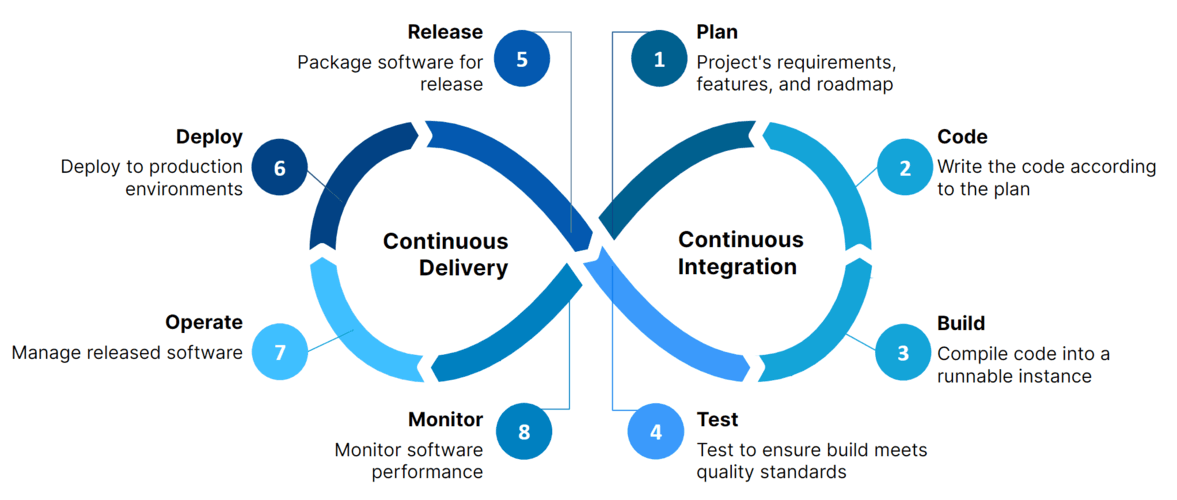
Advanced CI/CD Pipelines: From Jenkins to GitLab and Beyond
Modern software delivery requires sophisticated CI/CD pipelines that automate testing, security scanning, and deployments while maintaining high quality and reliability. This guide explores advanced pipeline patterns and best practices.
Advanced Jenkins Pipeline Architecture
Jenkins pipelines can be architected for maximum flexibility and reusability using shared libraries, parallel execution, and conditional logic for different environments and deployment strategies.
// Advanced Jenkins Pipeline with Shared Libraries
@Library('company-shared-library@main') _

pipeline {
    agent none

    parameters {
        choice(
            name: 'ENVIRONMENT',
            choices: ['dev', 'staging', 'production'],
            description: 'Target environment for deployment'
        )
        booleanParam(
            name: 'SKIP_TESTS',
            defaultValue: false,
            description: 'Skip test execution'
        )
        booleanParam(
            name: 'SECURITY_SCAN',
            defaultValue: true,
            description: 'Perform security scanning'
        )
    }

    environment {
        DOCKER_REGISTRY = credentials('docker-registry')
        KUBECONFIG = credentials('kubeconfig-prod')
        SONAR_TOKEN = credentials('sonar-token')
        APP_VERSION = sh(
            script: "git describe --tags --always --dirty",
            returnStdout: true
        ).trim()
    }

    stages {
        stage('Parallel Build & Analysis') {
            parallel {
                stage('Build Application') {
                    agent {
                        kubernetes {
                            yaml """
                                apiVersion: v1
                                kind: Pod
                                spec:
                                  containers:
                                  - name: node
                                    image: node:18-alpine
                                    command:
                                    - sleep
                                    args:
                                    - 99d
                                  - name: docker
                                    image: docker:20.10-dind
                                    securityContext:
                                      privileged: true
                            """
                        }
                    }
                    steps {
                        container('node') {
                            script {
                                buildSteps = [
                                    'npm ci',
                                    'npm run build',
                                    'npm run test:unit'
                                ]

                                if (!params.SKIP_TESTS) {
                                    buildSteps.addAll([
                                        'npm run test:integration',
                                        'npm run test:e2e'
                                    ])
                                }

                                buildSteps.each { step ->
                                    sh step
                                }
                            }
                        }

                        container('docker') {
                            script {
                                def image = docker.build(
                                    "${DOCKER_REGISTRY}/myapp:${APP_VERSION}"
                                )

                                docker.withRegistry(
                                    'https://registry.hub.docker.com',
                                    'docker-registry'
                                ) {
                                    image.push()
                                    image.push('latest')
                                }
                            }
                        }
                    }
                }

                stage('Security & Quality Analysis') {
                    agent {
                        docker {
                            image 'sonarqube/sonar-scanner-cli:latest'
                        }
                    }
                    when {
                        equals expected: true, actual: params.SECURITY_SCAN
                    }
                    steps {
                        script {
                            parallel([
                                'SAST Scan': {
                                    sh """
                                        sonar-scanner \
                                          -Dsonar.projectKey=myapp \
                                          -Dsonar.sources=src \
                                          -Dsonar.host.url=${SONAR_HOST_URL} \
                                          -Dsonar.login=${SONAR_TOKEN}
                                    """
                                },
                                'Dependency Check': {
                                    sh 'npm audit --audit-level high'
                                    sh 'npm run security:check'
                                },
                                'License Compliance': {
                                    sh 'npm run license:check'
                                }
                            ])
                        }
                    }
                }
            }
        }

        stage('Deploy to Environment') {
            agent {
                kubernetes {
                    yaml """
                        apiVersion: v1
                        kind: Pod
                        spec:
                          serviceAccountName: jenkins-deployer
                          containers:
                          - name: kubectl
                            image: bitnami/kubectl:latest
                            command:
                            - sleep
                            args:
                            - 99d
                          - name: helm
                            image: alpine/helm:latest
                            command:
                            - sleep
                            args:
                            - 99d
                    """
                }
            }
            steps {
                container('helm') {
                    script {
                        def deploymentStrategy = getDeploymentStrategy(params.ENVIRONMENT)

                        switch(deploymentStrategy) {
                            case 'blue-green':
                                deployBlueGreen()
                                break
                            case 'canary':
                                deployCanary()
                                break
                            case 'rolling':
                                deployRolling()
                                break
                            default:
                                error "Unknown deployment strategy: ${deploymentStrategy}"
                        }
                    }
                }
            }
        }

        stage('Post-Deployment Tests') {
            parallel {
                stage('Smoke Tests') {
                    steps {
                        script {
                            runSmokeTests(params.ENVIRONMENT)
                        }
                    }
                }

                stage('Performance Tests') {
                    when {
                        anyOf {
                            environment name: 'ENVIRONMENT', value: 'staging'
                            environment name: 'ENVIRONMENT', value: 'production'
                        }
                    }
                    steps {
                        script {
                            runPerformanceTests(params.ENVIRONMENT)
                        }
                    }
                }
            }
        }
    }

    post {
        always {
            publishTestResults testResultsPattern: 'test-results.xml'
            publishHTML([
                allowMissing: false,
                alwaysLinkToLastBuild: false,
                keepAll: true,
                reportDir: 'coverage',
                reportFiles: 'index.html',
                reportName: 'Coverage Report'
            ])
        }

        success {
            slackSend(
                channel: '#deployments',
                color: 'good',
                message: "✅ Deployment successful: ${env.JOB_NAME} - ${env.BUILD_NUMBER}"
            )
        }

        failure {
            slackSend(
                channel: '#deployments',
                color: 'danger',
                message: "❌ Deployment failed: ${env.JOB_NAME} - ${env.BUILD_NUMBER}"
            )
        }
    }
}

// Shared library functions
def getDeploymentStrategy(environment) {
    def strategies = [
        'dev': 'rolling',
        'staging': 'canary',
        'production': 'blue-green'
    ]
    return strategies[environment] ?: 'rolling'
}
📝 Use parallel execution for independent tasks, cache dependencies between builds, and implement proper artifact management to reduce pipeline execution time.
Tags
Share this article
Enjoying the Content?
If this article helped you, consider buying me a coffee ☕
Your support helps me create more quality content for the community!
☕ Every coffee fuels more tutorials • 🚀 100% goes to creating better content • ❤️ Thank you for your support!
About Amr S.
Passionate about web development and sharing knowledge with the community. Writing about modern web technologies, best practices, and developer experiences.
More from Amr S.
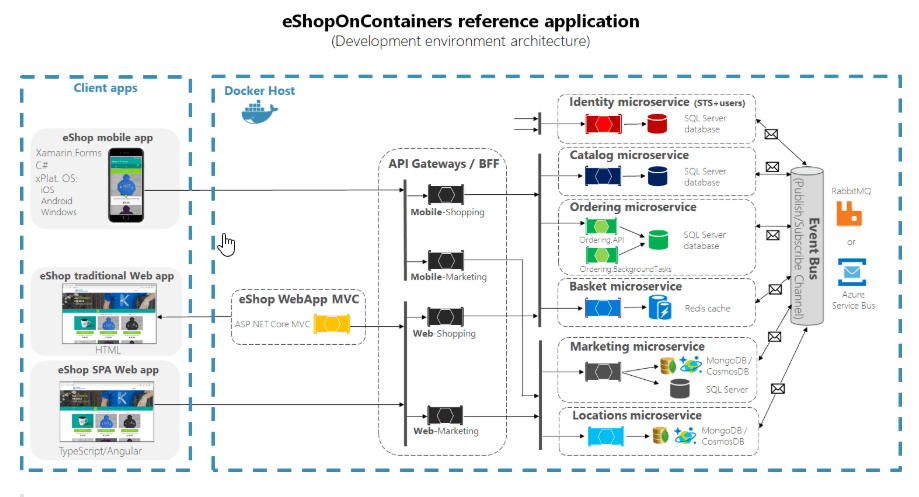
Building Microservices with RabbitMQ: A Complete Guide
Learn how to implement message-driven microservices architecture using RabbitMQ with practical examples and best practices.
Modern TypeScript Development: Advanced Patterns and Best Practices
Explore cutting-edge TypeScript features, design patterns, and architectural approaches that will elevate your development skills and code quality to the next level.
Advanced React Performance Optimization: From Rendering to Memory Management
Dive deep into React performance optimization with concurrent features, advanced memoization strategies, and memory management techniques for building lightning-fast web applications.