Kubernetes Production Deployment Strategies: Zero-Downtime and Advanced Patterns
Learn advanced Kubernetes deployment strategies including blue-green deployments, canary releases, and GitOps workflows to achieve zero-downtime deployments in production environments.
Amr S.
Author & Developer
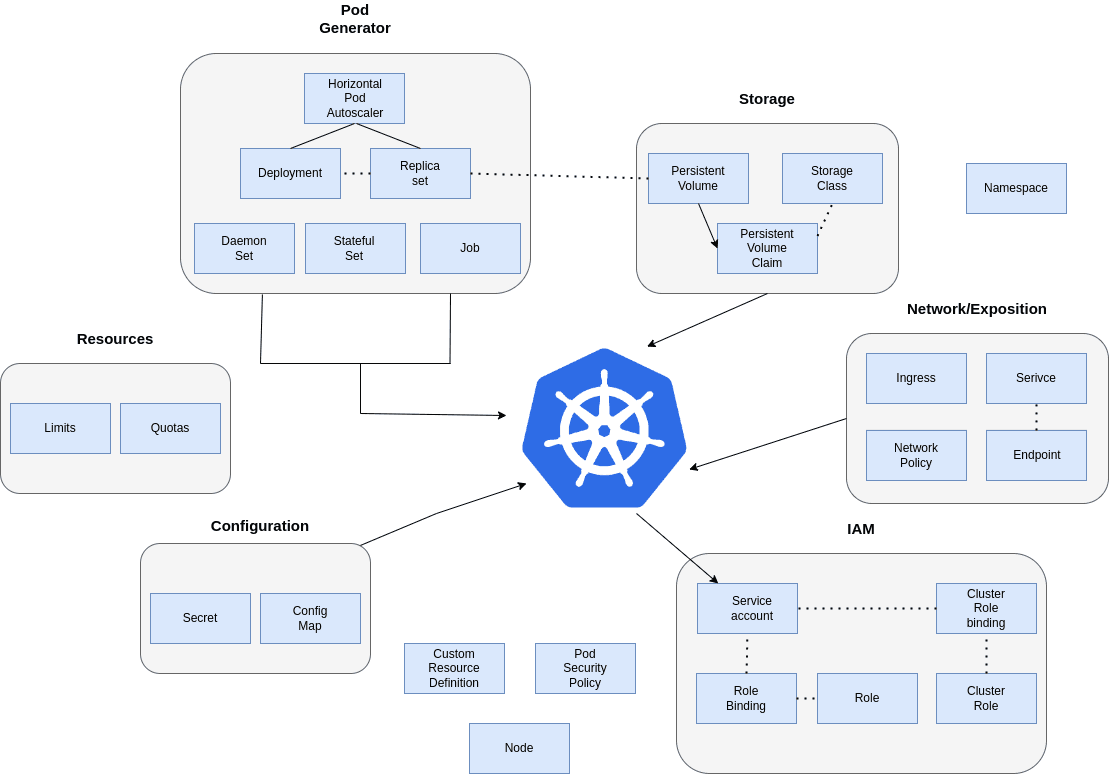
Kubernetes Production Deployment Strategies: Zero-Downtime and Advanced Patterns
Deploying applications to production requires sophisticated strategies that minimize risk and ensure zero downtime. This complete guide explores advanced Kubernetes deployment patterns that enable reliable, automated deployments at scale.
Blue-Green Deployment Strategy
Blue-green deployment maintains two identical production environments, allowing instant rollbacks and zero-downtime deployments by switching traffic between environments.
# Blue-Green Deployment Configuration
apiVersion: v1
kind: ConfigMap
metadata:
  name: deployment-config
  namespace: production
data:
  ACTIVE_SLOT: "blue"
  INACTIVE_SLOT: "green"

---
# Blue Environment Deployment
apiVersion: apps/v1
kind: Deployment
metadata:
  name: app-blue
  namespace: production
  labels:
    app: myapp
    slot: blue
    version: v1.2.3
spec:
  replicas: 3
  selector:
    matchLabels:
      app: myapp
      slot: blue
  template:
    metadata:
      labels:
        app: myapp
        slot: blue
        version: v1.2.3
    spec:
      containers:
      - name: app
        image: myapp:v1.2.3
        ports:
        - containerPort: 8080
        env:
        - name: SLOT
          value: "blue"
        resources:
          requests:
            memory: "512Mi"
            cpu: "250m"
          limits:
            memory: "1Gi"
            cpu: "500m"
        livenessProbe:
          httpGet:
            path: /health
            port: 8080
          initialDelaySeconds: 30
          periodSeconds: 10
        readinessProbe:
          httpGet:
            path: /ready
            port: 8080
          initialDelaySeconds: 5
          periodSeconds: 5

---
# Green Environment Deployment
apiVersion: apps/v1
kind: Deployment
metadata:
  name: app-green
  namespace: production
  labels:
    app: myapp
    slot: green
    version: v1.2.2
spec:
  replicas: 3
  selector:
    matchLabels:
      app: myapp
      slot: green
  template:
    metadata:
      labels:
        app: myapp
        slot: green
        version: v1.2.2
    spec:
      containers:
      - name: app
        image: myapp:v1.2.2
        ports:
        - containerPort: 8080
        env:
        - name: SLOT
          value: "green"
        resources:
          requests:
            memory: "512Mi"
            cpu: "250m"
          limits:
            memory: "1Gi"
            cpu: "500m"

---
# Service pointing to active slot
apiVersion: v1
kind: Service
metadata:
  name: app-service
  namespace: production
spec:
  selector:
    app: myapp
    slot: blue  # Switch between blue/green
  ports:
  - port: 80
    targetPort: 8080
  type: ClusterIP

---
# Ingress for external traffic
apiVersion: networking.k8s.io/v1
kind: Ingress
metadata:
  name: app-ingress
  namespace: production
  annotations:
    kubernetes.io/ingress.class: nginx
    cert-manager.io/cluster-issuer: letsencrypt-prod
    nginx.ingress.kubernetes.io/ssl-redirect: "true"
spec:
  tls:
  - hosts:
    - api.myapp.com
    secretName: app-tls
  rules:
  - host: api.myapp.com
    http:
      paths:
      - path: /
        pathType: Prefix
        backend:
          service:
            name: app-service
            port:
              number: 80
📝 Blue-green deployments provide instant rollbacks, zero downtime, and the ability to test the new version in production before switching traffic. However, they require double the resources.
Canary Deployment with Istio
Canary deployments gradually shift traffic to the new version, allowing you to monitor metrics and roll back if issues are detected. Istio provides advanced traffic management for canary deployments.
# Canary Deployment with Istio
apiVersion: argoproj.io/v1alpha1
kind: Rollout
metadata:
  name: app-rollout
  namespace: production
spec:
  replicas: 10
  strategy:
    canary:
      canaryService: app-canary
      stableService: app-stable
      trafficRouting:
        istio:
          virtualService:
            name: app-vs
            routes:
            - primary
      steps:
      - setWeight: 10
      - pause: {duration: 2m}
      - setWeight: 20
      - pause: {duration: 2m}
      - setWeight: 50
      - pause: {duration: 5m}
      - setWeight: 80
      - pause: {duration: 2m}
      analysis:
        templates:
        - templateName: success-rate
        args:
        - name: service-name
          value: app-canary
  selector:
    matchLabels:
      app: myapp
  template:
    metadata:
      labels:
        app: myapp
    spec:
      containers:
      - name: app
        image: myapp:latest
        ports:
        - containerPort: 8080

---
# Virtual Service for traffic splitting
apiVersion: networking.istio.io/v1beta1
kind: VirtualService
metadata:
  name: app-vs
  namespace: production
spec:
  hosts:
  - api.myapp.com
  http:
  - name: primary
    match:
    - headers:
        canary:
          exact: "true"
    route:
    - destination:
        host: app-canary
        port:
          number: 80
      weight: 100
  - route:
    - destination:
        host: app-stable
        port:
          number: 80
      weight: 90
    - destination:
        host: app-canary
        port:
          number: 80
      weight: 10

---
# Analysis Template for automated validation
apiVersion: argoproj.io/v1alpha1
kind: AnalysisTemplate
metadata:
  name: success-rate
  namespace: production
spec:
  args:
  - name: service-name
  metrics:
  - name: success-rate
    interval: 2m
    count: 3
    successCondition: result[0] >= 0.95
    failureLimit: 2
    provider:
      prometheus:
        address: http://prometheus.monitoring:9090
        query: |
          sum(irate(
            istio_requests_total{
              destination_service_name="{{args.service-name}}",
              response_code!~"5.*"
            }[2m]
          )) /
          sum(irate(
            istio_requests_total{
              destination_service_name="{{args.service-name}}"
            }[2m]
          ))
Tags
Share this article
Enjoying the Content?
If this article helped you, consider buying me a coffee ☕
Your support helps me create more quality content for the community!
☕ Every coffee fuels more tutorials • 🚀 100% goes to creating better content • ❤️ Thank you for your support!
About Amr S.
Passionate about web development and sharing knowledge with the community. Writing about modern web technologies, best practices, and developer experiences.
More from Amr S.
Building Microservices with RabbitMQ: A Complete Guide
Learn how to implement message-driven microservices architecture using RabbitMQ with practical examples and best practices.

Modern TypeScript Development: Advanced Patterns and Best Practices
Explore cutting-edge TypeScript features, design patterns, and architectural approaches that will elevate your development skills and code quality to the next level.

Advanced React Performance Optimization: From Rendering to Memory Management
Dive deep into React performance optimization with concurrent features, advanced memoization strategies, and memory management techniques for building lightning-fast web applications.